
Prestia Student & Visitor Kiosk Campus Sign-In & Security
Every Person on Campus.
Accounted For.
In Real Time.
The Prestia Student & Visitor Kiosk replaces your paper sign-in with a live digital system connected directly to the SMS or LMS your school already uses.
No new systems to learn. No data to re-enter. Start with the kiosk connect more when you’re ready.
Integrated with Prestia SMS
Works with your existing platforms
Hardware available or BYO
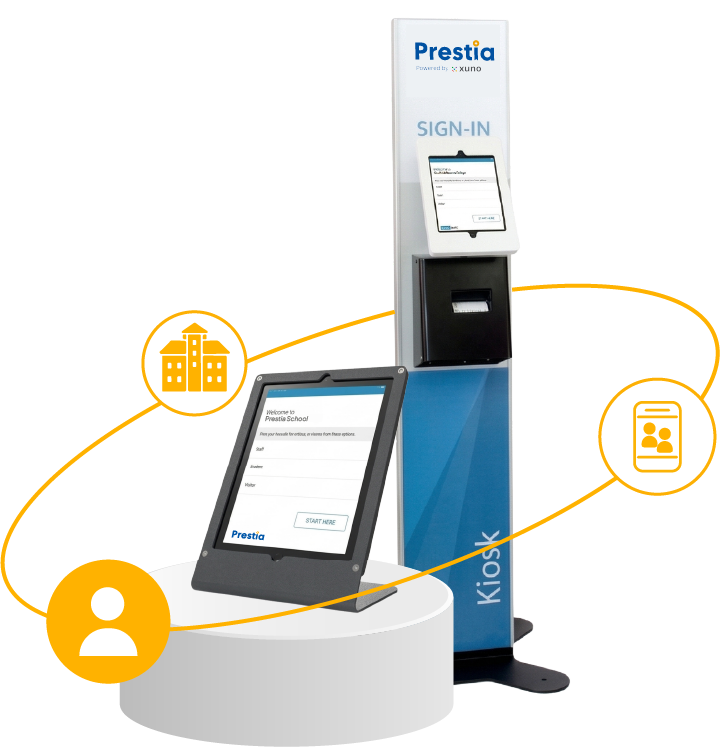
Do You Know Who’s on Campus Right Now?
When the fire alarm goes off, someone has to run to reception and collect the paper sign-in book. That’s your live evacuation list. A paper book, retrieved by hand, in an emergency.
It’s the same system your school uses every day. Visitors sign in at reception. Late students have a separate process a slip, a call to the office. Contractors walk in and sign wherever someone remembers to ask them. By the end of the day, nobody has a complete picture of who came and went and in any moment that matters, there’s no live record to fall back on.
The Prestia Student & Visitor Kiosk replaces that gap with a real system live, integrated, and connected to the platforms your school already runs. Most schools start with a 30-minute demo.
It’s Not a Standalone Device.
The Prestia Student & Visitor Kiosk is a touchscreen sign-in system for everyone on campus students, parents, visitors, contractors, and staff. Every sign-in is live across Prestia immediately. Attendance records update. Visitor passes are generated. The evacuation report is current. No manual steps between any of these.
What makes it different from a standalone kiosk is what happens behind the screen. Prestia connects the kiosk directly to your existing SMS or MIS whether you’re running iSAMS, PowerSchool, anageBac, or another platform. A late student signing in at the kiosk appears on the class teacher’s attendance page in the same system your school already uses. No double entry. No data gaps.
“No more paper books. No more plastic badges. Just a clear, live record of every person on campus connected to the systems you already have.”
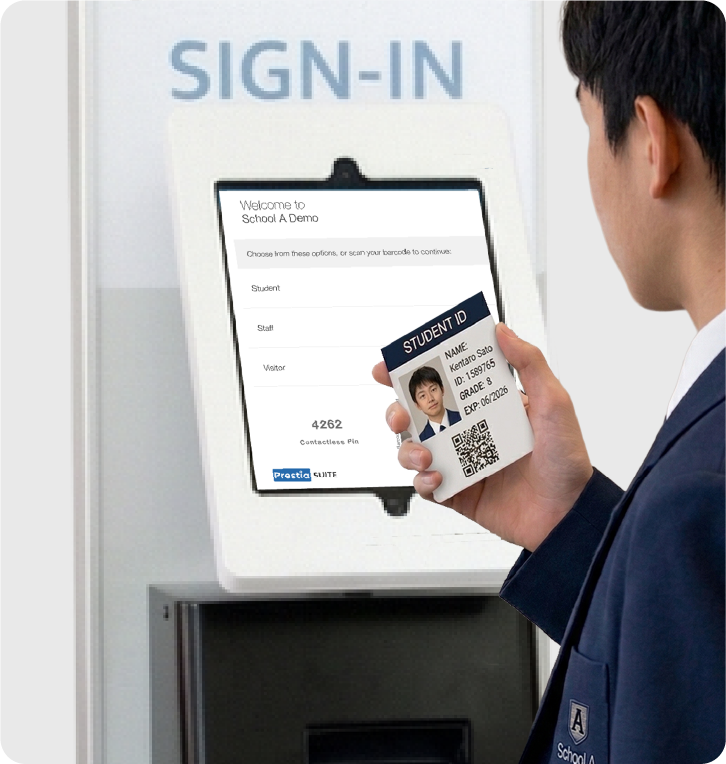
Works With the Platforms
Your School Already Uses.
Your school didn’t choose one system. You built up a set of platforms over time each one good at what it does, none of them knowing what the others know. The Prestia Student & Visitor Kiosk connects directly into that existing setup.
“A student signing in at the kiosk appears on the class teacher’s attendance page in real time. No double entry. No data gaps.”
LMS



SMS / MIS



Admissions

Running a platform not listed here? Our technical team will assess compatibility during your free consultation at no cost.
Everything That Happens the Moment
Someone Signs In.
Twelve capabilities. All of them automatic. All of them integrated with your
existing platforms from day one.

One System. Every Person on Campus.
Students, parents, visitors, contractors, and staff all signing in through one unified system. No separate processes, no separate logs. Barcodes, QR codes, or name search.

Live Across Your School Instantly.
Everything entered at the kiosk flows into Prestia and your connected platforms in real time attendance records, visitor logs, and emergency reports update the moment someone signs in.

Late Arrival Management
Late students sign in at the kiosk and a pass is printed or sent automatically. The arrival appears immediately on the class teacher’s attendance page in the same SMS your school already uses. No manual follow-up.

Visitor Passes Print or Digital
Visitor passes are printed on the spot, or sent as a QR code via SMS or the Prestia App. Pre-registered visitors are processed even faster.

Watchlist & Access Control
Flag individuals who should not enter the school. The kiosk alerts staff immediately if a flagged person attempts to sign in a critical safeguarding layer for schools with child protection obligations.

Working With Children Check Verification
WWCC numbers are verified in real time at the kiosk. Automated, auditable, documented. No manual checking by reception staff.

Contractor Tracking & Compliance
Contractors sign in with their details, role, and work area. Track contractor inductions and compliance records know exactly who is working on campus and why.

Contactless Sign-In
Visitors and parents hold up their phone no pen, no paper, no queue at reception. Fast enough that it doesn’t slow down the morning drop-off.

Live Emergency Evacuation Reports
In an emergency, the live evacuation report is available instantly from any authorised device every person currently signed in, their role, and sign-in time. No paper collection, no manual headcount.

Safeguarding Information Display
Child Safe and safeguarding information displayed on the kiosk screen. Every visitor sees your school’s child protection requirements at the point of entry.

Flexible Hardware Options
Floor-standing, desktop, or BYO hardware (iPad + optional stand + optional printer). Configure to suit your reception layout and budget.

Pre-Registration of Expected Visitors
Pre-register parents, contractors, and guests before they arrive. Faster sign-in, fewer queues at reception.
Built for the Way Indonesian Schools Operate.
The Prestia Student & Visitor Kiosk has been adapted for the safeguarding requirements, governance structures, and operational realities of schools in Indonesia.
Safeguarding Compliance
SPK international schools operate under strict child protection obligations. The watchlist, WWCC verification in real time, and child safe information display give school leaders auditable, documented evidence of safeguarding at the point of entry for every visitor, every day.
Multi-Campus Visibility
For school groups and multi-campus yayasan foundations, live sign-in data feeds into the same centralised Prestia platform giving group leadership visibility across all locations, not just individual campuses.
Emergency Readiness
Emergency evacuations require accurate headcounts. The live evacuation report is available instantly from any authorised device no paper to collect, no manual compilation. Updated in real time as people sign in and out throughout the day.
Your Starting Point. Not Your Ceiling.
The Student & Visitor Kiosk is a module within Prestia SMS not a standalone product. Every sign-in event connects directly to your student records, attendance data, and communication tools.
As your school grows with Prestia, the kiosk data flows into the wider ecosystem connecting to student records, attendance, parent communications, and finance.
Prestia Student & Visitor Kiosk is part of Prestia SMS and connects directly with Prestia Core when the full ecosystem is deployed. Available as a standalone solution for schools not yet running the full Prestia suite.
Common Questions.
Does the Student & Visitor Kiosk require Prestia SMS?
The kiosk is a module within Prestia SMS, so full SMS functionality is available when both are running together. However, the kiosk can also be deployed as a standalone sign-in solution for schools starting with campus security before adopting the full Prestia SMS platform. Your Technical Account Manager will help you decide where to start.
What hardware do we need?
The kiosk runs on an iPad mounted on a kiosk stand this is the key hardware requirement for getting live. Prestia offers dedicated kiosk stands for floor-standing and desktop configurations, or schools can source a compatible iPad stand themselves. Once the stand arrives, most schools are up and running within days. Your TAM will confirm the right configuration for your reception layout during the demo session.
How does the watchlist work?
Specific individuals can be added to the watchlist within Prestia. If a flagged person signs in at the kiosk, reception staff are alerted immediately visible on the kiosk screen and configurable to notify designated staff via the Prestia app. The watchlist operates within your school’s child protection policies and is not a substitute for formal security procedures.
Does it verify Working With Children Checks?
Yes in real time. When a contractor or visitor enters their WWCC number at the kiosk, the system verifies it automatically. Verified checks are recorded against the visitor’s sign-in entry, giving your school auditable, documented evidence of WWCC compliance at the point of entry. No manual checking by reception staff.
What happens during an emergency?
The live evacuation report is available instantly from any authorised device showing every person currently signed in, their name, role, and sign-in time. No paper to collect. No manual compilation. The report updates in real time as people sign in and out throughout the day.
Can the kiosk handle multiple entry points?
Yes. Schools with multiple entrances main reception, a secondary gate, a sports entrance can deploy kiosks at each entry point. All sign-in data feeds into the same centralised Prestia platform, giving you a single live view of everyone on campus regardless of which entrance they used. Multi-campus groups can manage all campuses from the same platform.
How is the kiosk priced?
Pricing is based on your school’s size and configuration. Because every school’s setup is different number of entry points, hardware requirements, existing platform stack we discuss pricing as part of the demo session, after we understand what’s right for your school. There’s no obligation to proceed.
We already have a digital sign-in system. Why would we switch?
If your current system doesn’t connect to your SMS or MIS meaning sign-in data stays in its own silo you’re still doing the manual work of transferring that information into your school’s records. The Prestia Student & Visitor Kiosk solves that gap specifically: every sign-in flows automatically into the platforms your school already runs. No silos. No double entry. If your current system already integrates fully with your SMS or MIS, we’ll tell you that honestly during the demo it’s not our job to replace something that’s working.
Ready to See It in Action?
Book a 30-minute demo to see how the Prestia Student & Visitor Kiosk connects to your school’s existing platforms.
What Happens in a Demo?
Platform Assessment
We review your current SMS/LMS and check integration compatibility.
Process Review
We look at how you currently manage visitors and late students.
Hardware Options
We discuss floor-standing, desktop, or BYO configurations.
Setup Roadmap
We outline the steps to get your school live within days.