
How One-time Password Works for Family App
What is a One-Time Password (OTP)?
A One-Time Password (OTP) is a temporary login code sent to a user’s email address. The code can only be used once and expires after a specific time period, providing a secure way for parents to access their XUNO account.
How the OTP Login Process Works
1. Select “Sign-in with one-time password”
On the XUNO Family App sign-in screen, parents will see a new option:
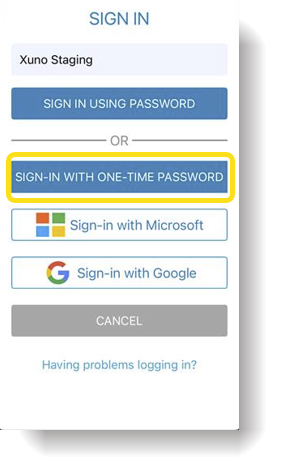
When a parent selects this option, they are taken to a page where they will be asked to enter:
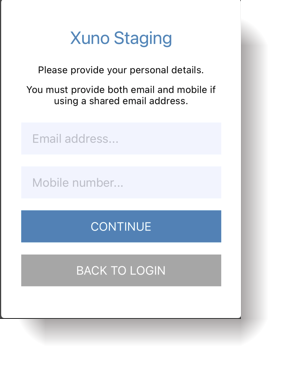
Note:
Some parents may share the same email address. If this is the case, then the mobile number must be entered. The mobile number acts as a second verification field to ensure the correct parent account is identified.
2. Requesting the OTP
After entering the email address and mobile number:
-
The information is sent securely to the XUNO server.
-
The system generates a temporary password (OTP) for the user.
-
A confirmation message appears advising the user that an email has been sent with their login code.
-
The user clicks Continue and is returned to the sign-in page.
3. Receiving the OTP Email
The parent will receive an email containing the temporary login code.
4. Signing In Using the OTP
The parent can now return to the login screen and sign in using:
-
Their username or email, and
-
The One-Time Password (OTP) sent via email.
Once logged in successfully, the parent will have access to their XUNO Family App or Parent Portal.
OTP Security and Expiry Rules
To ensure security, the OTP system follows these rules:
-
The OTP is a random 8-character password.
-
It includes a mix of numbers, lowercase letters, and uppercase letters.
-
The OTP expires after 15 minutes from the time it was generated.
- The OTP may only be used once.
-
If the OTP expires before being used, the parent must request a new OTP.
-
Parents should never share their OTP with anyone.
Handling Shared Email Addresses
If two parents share the same email address, the system uses the mobile number to identify the correct account.
In this case, the email will include the username so the parent knows exactly which account to use when logging in.
Family App Login Behaviour
After a parent logs in successfully using the OTP:
-
The Family App remains logged in.
-
Parents do not need to sign in every time the app is opened, provided the app remains installed on the device.
Cara Kerja One-Time Password (OTP) untuk Aplikasi Family
Untuk meningkatkan keamanan dan mempermudah proses masuk (login) bagi orang tua, fitur “Lupa Kata Sandi” di Aplikasi XUNO Family kini telah diganti dengan opsi masuk menggunakan One-Time Password (OTP) atau Kata Sandi Sekali Pakai. Dengan fitur ini, orang tua bisa mengakses akun mereka dengan aman tanpa perlu menyetel ulang atau mengingat kata sandi permanen.
Apa itu One-Time Password (OTP)?
One-Time Password (OTP) adalah kode masuk sementara yang dikirimkan ke alamat email pengguna. Kode ini hanya bisa digunakan satu kali dan akan hangus setelah jangka waktu tertentu. Cara ini memberikan akses yang jauh lebih aman bagi orang tua untuk masuk ke akun XUNO mereka.
Alur Proses Masuk dengan OTP
Aturan Keamanan dan Masa Kedaluwarsa OTP
Untuk menjaga keamanan akun, sistem OTP ini mengikuti aturan ketat berikut:
-
Format Acak: OTP terdiri dari 8 karakter acak (kombinasi angka, huruf kecil, dan huruf kapital).
-
Batas Waktu: OTP akan kedaluwarsa dalam waktu 15 menit setelah dibuat.
-
Sekali Pakai: Kode hanya bisa digunakan satu kali. Jika hangus sebelum dipakai, orang tua harus meminta kode OTP yang baru.
-
Rahasia: Jangan pernah membagikan kode OTP Anda kepada siapa pun.
Bagaimana Jika Satu Email Digunakan Bersama?
Jika ada dua orang tua yang menggunakan satu alamat email yang sama, sistem akan menggunakan nomor HP untuk mengidentifikasi akun mana yang tepat.
Dalam situasi ini, email yang dikirimkan juga akan menyertakan username (nama pengguna), sehingga orang tua tahu persis akun mana yang sedang mereka gunakan untuk masuk.
Ketentuan Login di Aplikasi Family
Setelah orang tua berhasil masuk menggunakan OTP:
-
Aplikasi Family akan tetap dalam kondisi masuk (logged in).
-
Orang tua tidak perlu masuk atau mengetik ulang kode setiap kali membuka aplikasi, selama aplikasi tersebut tidak dihapus dari perangkat (HP/tablet).