
Skip to main content

What can we help you with?
How to Generate a Suspensions Report
How to Generate a Suspensions Report
Steps
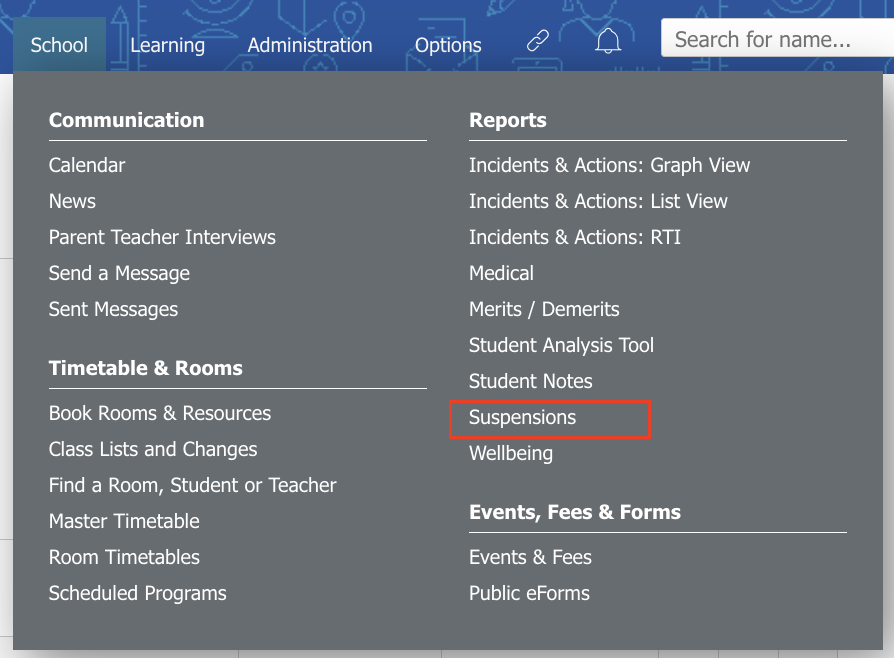
- Go to School > Reports > Suspensions.
- Use the Date Filters at the top of the page to specify the data range for your report.
- Click on the Filter icon to choose additional filtering options.
- Click on the Show button to generate the report.
- To print or export this report to a CSV file, click on the corresponding Print or Export to CSV icons at the top of the page.
Cara Membuat Laporan Suspensi
1. Buka School > Reports > Suspensions.
2. Gunakan Date Filters di bagian atas halaman untuk menentukan rentang tanggal data yang ingin ditampilkan dalam laporan.
3. Klik ikon Filter untuk memilih opsi penyaringan tambahan sesuai kebutuhan.
4. Klik tombol Show untuk menghasilkan laporan.
5. Untuk mencetak atau mengekspor laporan ke file CSV, klik ikon Print atau Export to CSV yang tersedia di bagian atas halaman.