
Skip to main content
What can we help you with?
How to Add or View Staff Medical Information
Anda dapat menggunakan Prestia untuk menambahkan informasi medis Anda sendiri tentang staf seperti alergi, kunjungan ke ruang kesehatan, perawatan, peringatan, rencana perawatan, dan lainnya.
- Pilih anggota staf dari bilah pencarian.
- Klik pada item Medisdi menu kiri.
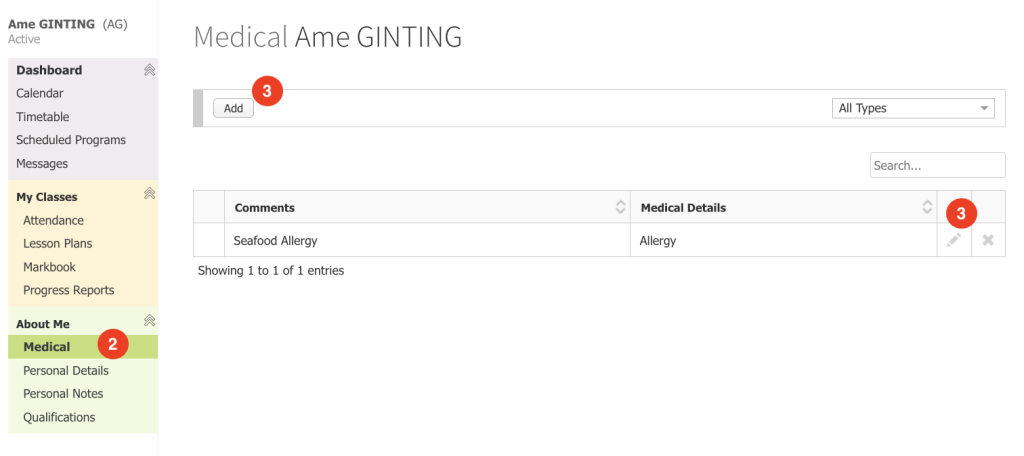
- Klik tombol edit yang sesuai dengan catatan yang ingin Anda ubah; atau klik tombol Tambah untuk membuat catatan medis baru.
- Isi atau sesuaikan detail yang Anda perlukan dan lampirkan dokumen yang diperlukan.
- Klik tombol Simpan.
You can use Prestia to add your own medical information about staff such as allergies, sick bay visits, treatments, alerts, treatment plans, and more.
steps
- Select a staff member from the search bar.
- Click on the Medical item in the left menu.
- Click on the edit button that corresponds to the record that you want to modify; or click the Add button to create a new medical record.
- Fill in or adjust any details that you require and attach any documents required.
- Click the Save button.