
Adding, Viewing and Deleting Merits and Demerits
Adjusting merit or demerit points individually, or viewing the points of each student
The Points column refers to the actual points allocated to the merit or demerit. The Total Points column refers to the total accumulation of points from the start of the year to the selected month. Merit points increase the total points while demerit points decrease the total points. Therefore the higher the points, the better a student is performing; and the lower the total points the worse the student is performing.
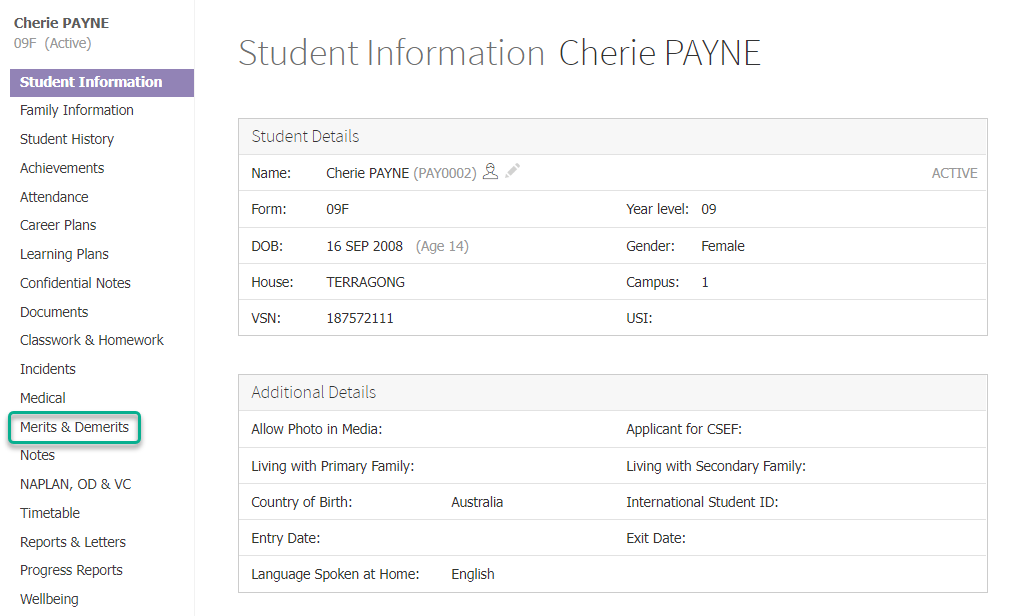
- Find a student using the search bar and click on their name to go to their student dashboard.
- Click the Merits & Demerits item in the left hand menu.
- Filter your results using the month and year dropdown lists.
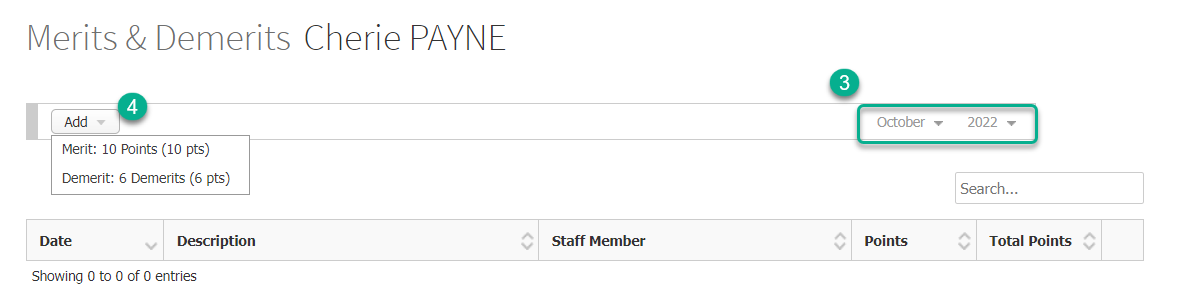
- To add merit or demerit points, click on the Add button and select an item from the dropdown list to add a new merit or demerit item and its points.
- The table shows merit/demerit items in date order, with the most recent at the top. You can see the current total points in the top row, in the Total Points column.
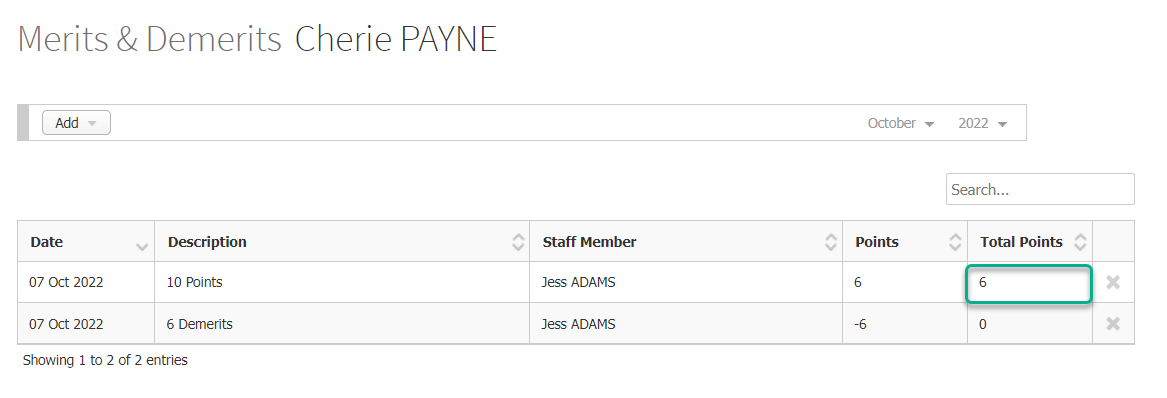
- You can sort by any column with up/down arrows in its column header, or use the report’s Search bar to find specific items.
- You can delete a merit/demerit item by clicking on the X icon and clicking OK.
Adding merit or demerit points together with an Achievement or Incident
When adding an achievement or incident, select the merit or demerit points you wish to apply to them from the Merit Points dropdown list. You can adjust the settings and visibility of the Merit Points drop down list by modifying your incident default settings.
Menyesuaikan poin merit atau demerit secara individual, atau melihat poin setiap siswa
Kolom Poin mengacu pada poin aktual yang dialokasikan untuk merit atau demerit. Kolom Total Poin mengacu pada total akumulasi poin dari awal tahun hingga bulan yang dipilih. Poin merit meningkatkan total poin sementara poin demerit menurunkan total poin. Oleh karena itu, semakin tinggi poinnya, semakin baik kinerja siswa; dan semakin rendah total poin, semakin buruk kinerja siswa.
Langkah
- Cari siswa menggunakan bilah pencarian dan klik namanya untuk membuka dashboard siswa mereka.
- Klik item Merits & Demerits di menu sebelah kiri.
- Saring hasil Anda menggunakan daftar drop-down bulan dan tahun.
- Untuk menambah poin merit atau demerit, klik tombol Add dan pilih item dari daftar drop-down untuk menambahkan item merit atau demerit baru beserta poinnya.
- Tabel menunjukkan item merit/demerit dalam urutan tanggal, dengan yang terbaru di bagian atas. Anda dapat melihat total poin saat ini di baris teratas, di kolom Total Poin .
- Anda dapat mengurutkan berdasarkan kolom apa pun dengan panah naik/turun di header kolomnya, atau gunakan bilah Search laporan untuk menemukan item tertentu.
- Anda dapat menghapus item merit/demerit dengan mengeklik ikon X dan mengeklik OK .
Menambah poin merit atau demerit bersamaan dengan Pencapaian atau Insiden
Saat menambahkan pencapaian atau insiden, pilih poin merit atau demerit yang ingin Anda terapkan dari daftar drop-down Merit Points. Anda dapat menyesuaikan pengaturan dan visibilitas daftar drop-down Merit Points dengan memodifikasi pengaturan default insiden Anda.