
Skip to main content
What can we help you with?
Viewing Student Academic Reports
Prestia menyediakan tempat terpusat bagi Anda untuk mengakses dan mencetak laporan siswa saat ini dan sebelumnya. Meskipun laporan dapat disimpan dalam format elektronik apa pun (misalnya .docx dan PDF), kami merekomendasikan agar laporan disimpan dalam format Adobe PDF, sehingga mencegah siapa pun mengubah laporan tersebut.
Langkah
- Cari siswa menggunakan bilah pencarian dan klik nama mereka untuk membuka dashboard siswa mereka.
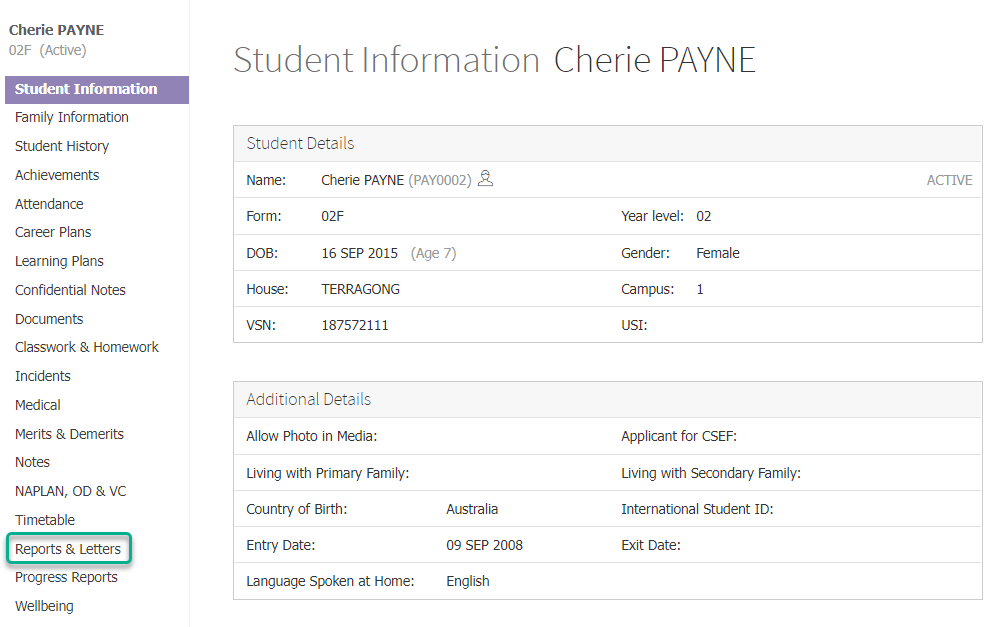
- Klik pada item Reports & Letters di menu sebelah kiri.
- Di bawah bagian Academic Reports, klik laporan yang ingin Anda lihat atau cetak.
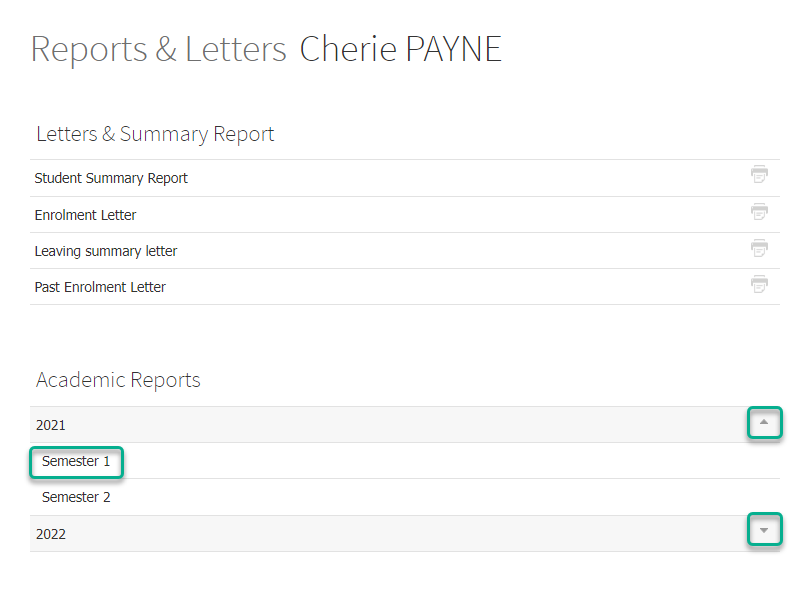
- Anda dapat memperluas atau menciutkan laporan untuk setiap tahun menggunakan panah atas atau bawah di akhir baris yang berisi tahun tersebut.
Prestia provides you with a centralised place to access and print current and previous student reports. While reports can be stored in any electronic format (e.g. .docx and PDF), we recommend that they are stored in Adobe PDF format, thus preventing anyone from changing the reports.
Steps
- Find a student using the search bar and click on their name to go to their student dashboard.
- Click on the Reports & Letters item in the left hand menu.
- Under the Academic Reports section, click on the report you would like to view or print.
- You can expand or collapse the reports for each year using the up or down arrows at the end of the row containing the year.