
Decline an event or fee in Prestia
Who is this article for?
Schools using Prestia to create events and fees, including excursions, curriculum contributions, incursions or student permission forms. You will need to have the correct permissions to be able to create and/or approve and publish events and fees in Prestia.
Overview
Schools use Prestia events & fees for a variety of reasons. Sometimes, schools would like to give parents the option to decline participation for their child in an event, permission, or a voluntary payment. This means that you can clearly see the reason why a parent has not yet completed their approval for a given event or fee. It also means that the event or fee won’t clutter up the parent’s dashboard or calendar, if they do not wish their child to attend.
Allowing parents to decline an event or fee
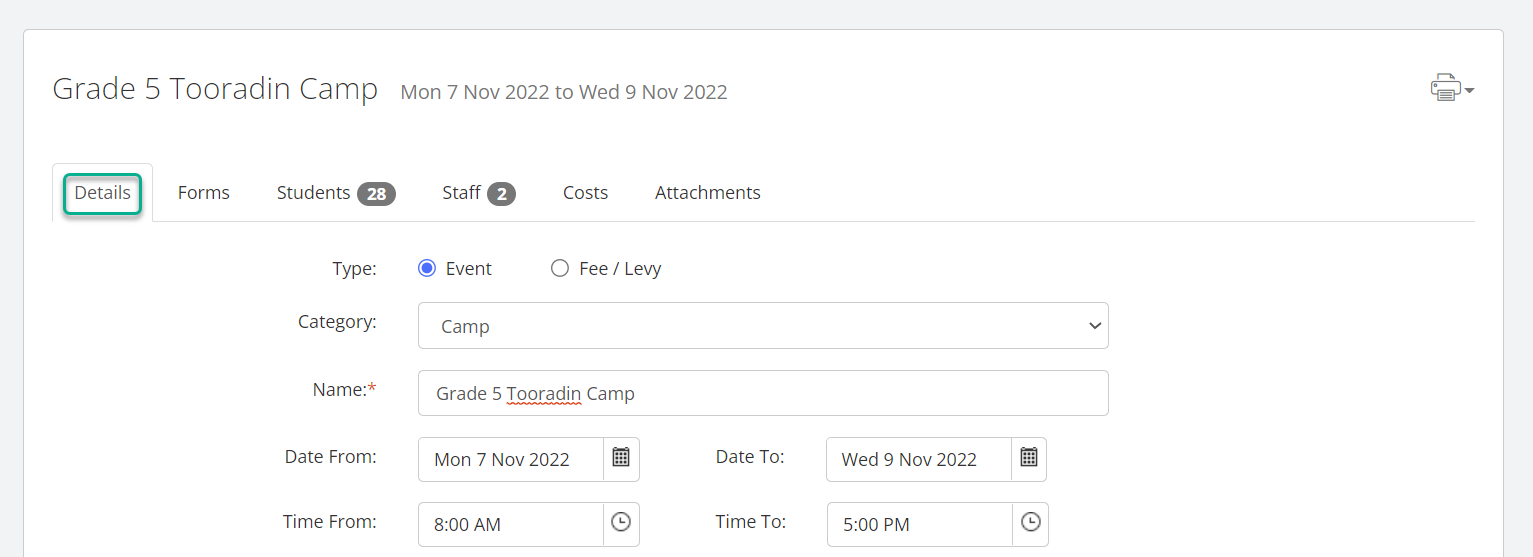
- When you are creating an event or fee, you will see a new option on the Details tab.
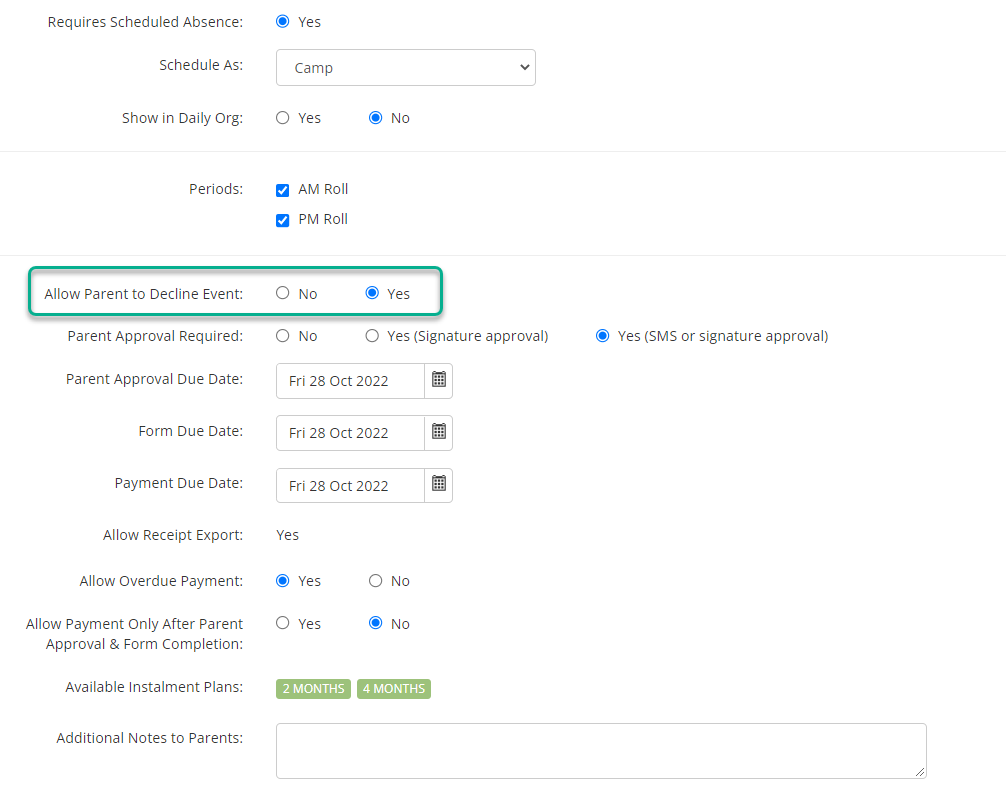
- Scroll down and tick the Yes radio button next to Allow Parent to Decline Event: to activate this option.
New options on the Students tab
- When you click on the Students tab in the event or fee, you will see that the Parent Approval column now has a dropdown list for each student.
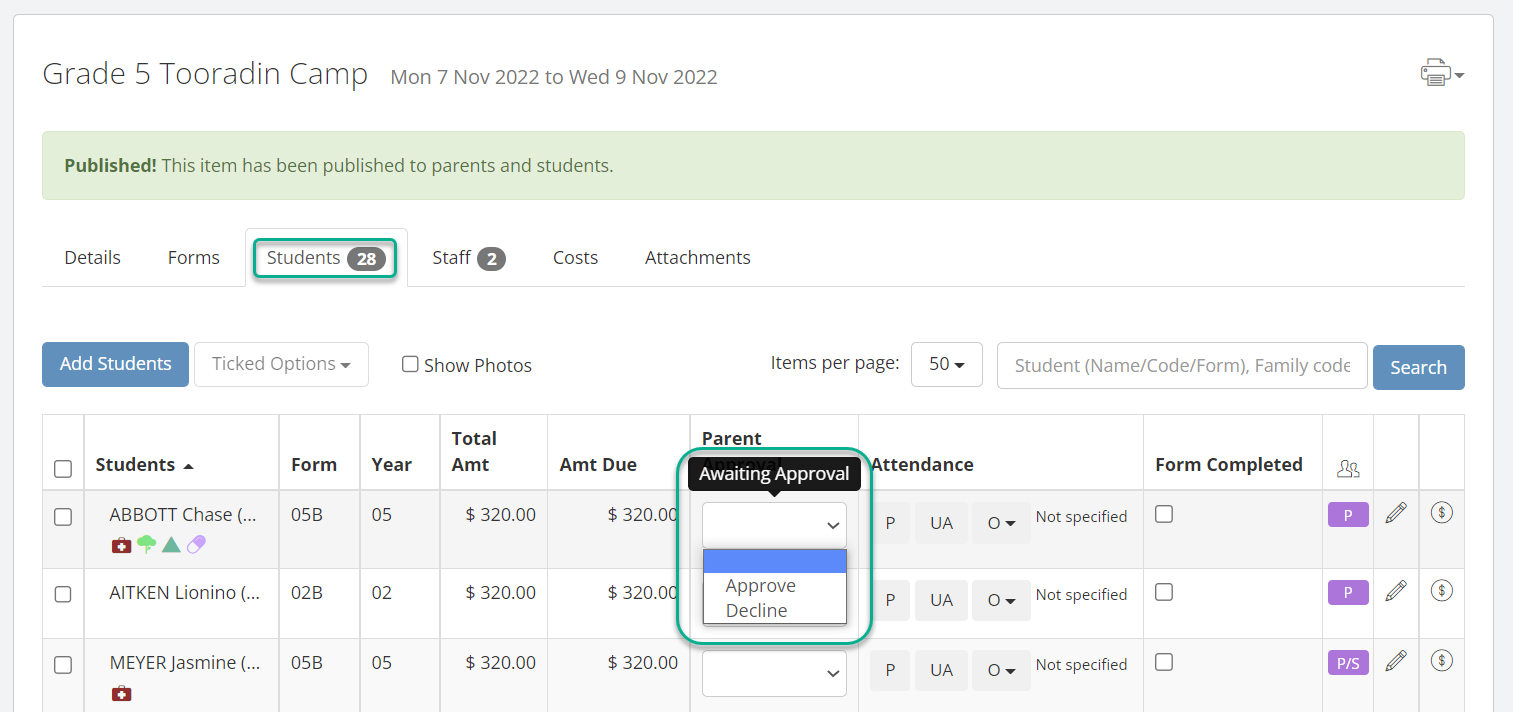
- You can use this dropdown to change the status between the three options – Awaiting Approval (blank), Approve, or Decline. (Note that Decline will only appear as an option if this has been enabled for this event or fee, as described in the previous section).
- Hovering your mouse over the cell will show you the details of who last changed the status of the approval, whether this was a parent/carer or a staff member.
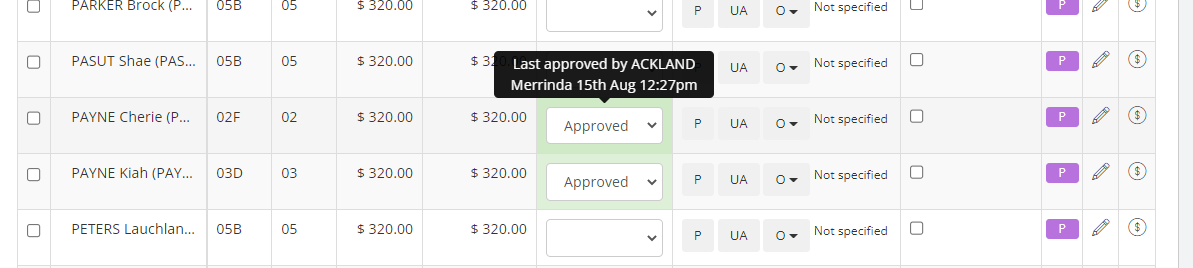
- If a parent has declined the event/fee and added a comment, this will also show up in the details.
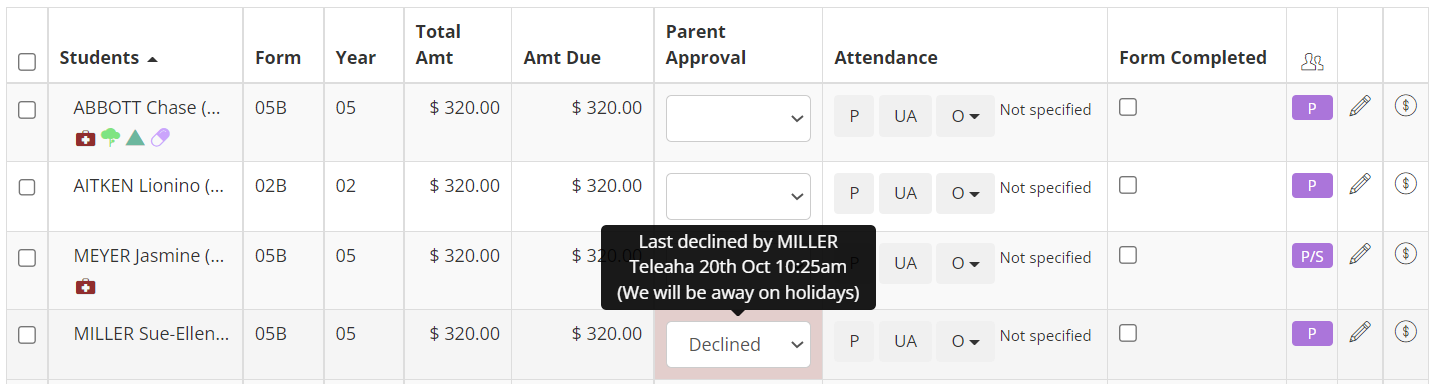
- Note that you can still sort by the Parent Approval column, and you will be able to see parents ordered by whether they have yet to approve, have approved, or have declined. Click on the column header to sort by a column’s contents.
Viewing the students report
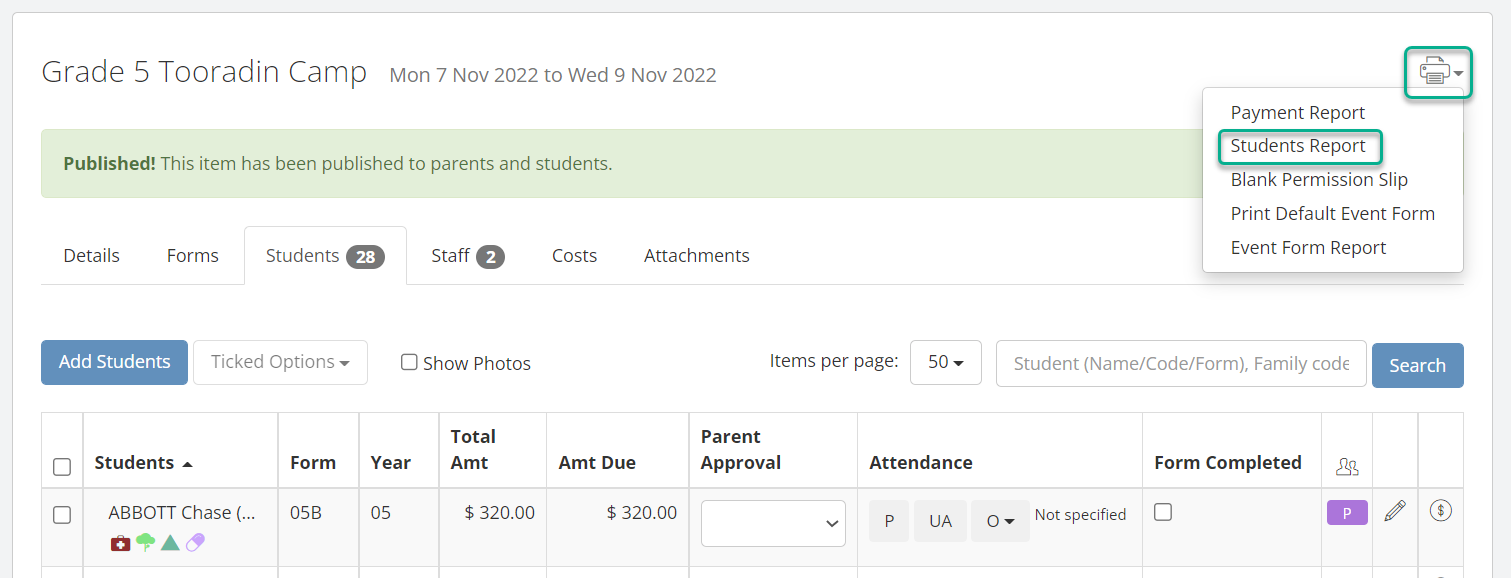
- You can decide whether or not to include students who have declined the event in the students report. To access this report, click on the Printer icon in the top left of the screen, and select Students Report.
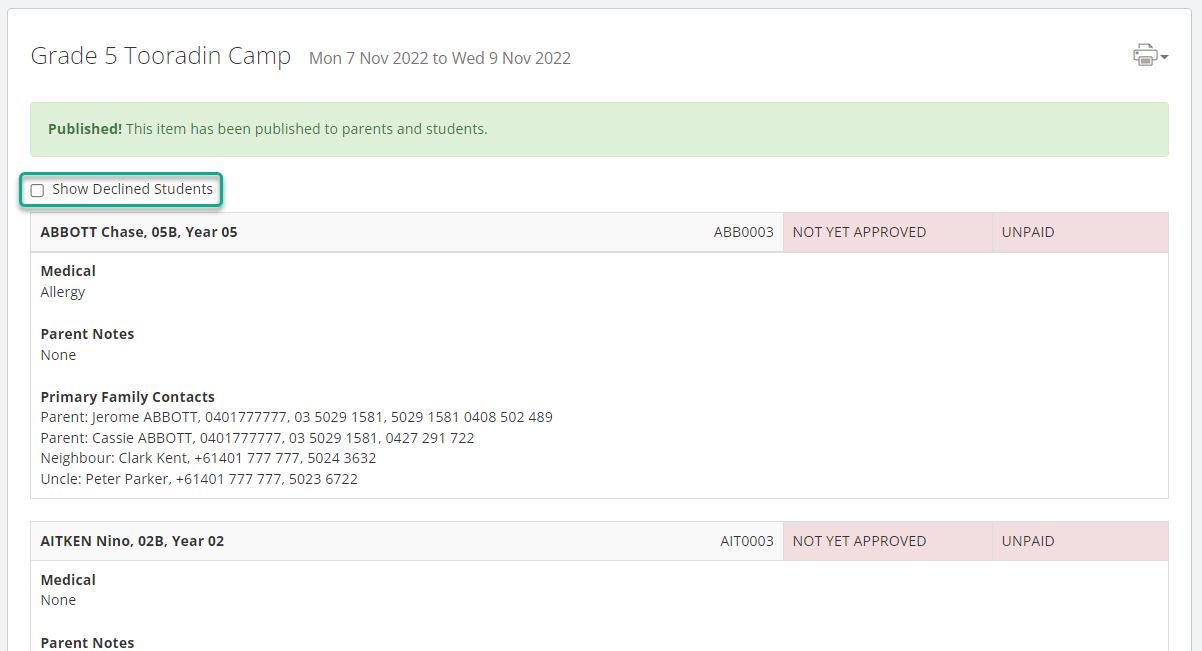
- In the report, you can tick the checkbox shown to Show Declined Students. The declined students are displayed in the report instantly – there is no need to save or refresh the page.
Menolak Acara atau Biaya di Prestia
Anda dapat memberikan opsi bagi orang tua untuk menolak partisipasi anak mereka dalam suatu acara atau pembayaran biaya.
Untuk Siapa Artikel Ini?
Sekolah yang menggunakan Prestia untuk membuat acara dan biaya, termasuk ekskursi (kunjungan luar sekolah), sumbangan kurikulum, inkursi (kegiatan dengan pemateri dari luar), atau formulir izin siswa. Anda harus memiliki izin (permissions) yang sesuai untuk dapat membuat dan/atau menyetujui dan memublikasikan acara serta biaya di Prestia.
Gambaran Umum
Sekolah menggunakan fitur acara & biaya di Prestia untuk berbagai keperluan. Terkadang, sekolah ingin memberikan opsi kepada orang tua untuk menolak partisipasi anak mereka dalam suatu acara, izin, atau pembayaran sukarela. Dengan opsi ini, Anda dapat melihat secara jelas alasan mengapa orang tua belum atau tidak memberikan persetujuan untuk acara atau biaya tertentu. Opsi ini juga membantu agar dasbor atau kalender orang tua tidak dipenuhi dengan pemberitahuan yang tidak mereka inginkan jika anak mereka memang tidak akan hadir.
Memungkinkan Orang Tua Menolak Acara atau Biaya
Saat membuat acara atau biaya baru:
-
Buka tab Details (Rincian).
-
Gulir ke bawah lalu tandai tombol Yes di samping tulisan Allow Parent to Decline Event: (Izinkan Orang Tua Menolak Acara) untuk mengaktifkan opsi ini.
Opsi Baru pada Tab Students
Saat Anda mengklik tab Students (Siswa) pada acara atau biaya tersebut, Anda akan melihat bahwa kolom Parent Approval (Persetujuan Orang Tua) kini memiliki daftar pilihan (dropdown) untuk setiap siswa.
-
Anda dapat menggunakan dropdown ini untuk mengubah status di antara tiga opsi: Awaiting Approval (Menunggu Persetujuan – kosong), Approve (Setuju), atau Decline (Tolak). (Catatan: Opsi Decline hanya akan muncul jika fitur ini telah diaktifkan untuk acara atau biaya tersebut, seperti yang dijelaskan pada bagian sebelumnya).
-
Mengarahkan kursor (hover) ke sel tersebut akan menampilkan rincian mengenai siapa yang terakhir kali mengubah status persetujuan, baik itu orang tua/wali maupun staf sekolah.
-
Jika orang tua telah menolak acara/biaya dan menambahkan komentar, komentar tersebut juga akan muncul pada bagian rincian ini.
-
Anda tetap dapat mengurutkan data berdasarkan kolom Parent Approval, sehingga Anda bisa melihat daftar orang tua yang diurutkan berdasarkan status: belum menyetujui, sudah menyetujui, atau menolak. Klik pada judul kolom untuk mengurutkan isi kolom tersebut.
Melihat Laporan Siswa (Students Report)
Anda dapat menentukan apakah ingin menyertakan siswa yang telah menolak acara ke dalam laporan siswa atau tidak.
-
Untuk mengakses laporan ini, klik ikon Printer di sudut kiri atas layar, lalu pilih Students Report.
-
Di dalam laporan, Anda dapat mencentang kotak Show Declined Students (Tampilkan Siswa yang Menolak). Siswa yang menolak akan langsung ditampilkan di dalam laporan tanpa perlu menyimpan atau menyegarkan (refresh) halaman.