
Adding or removing coordinators for a student
Adding students to a coordinator
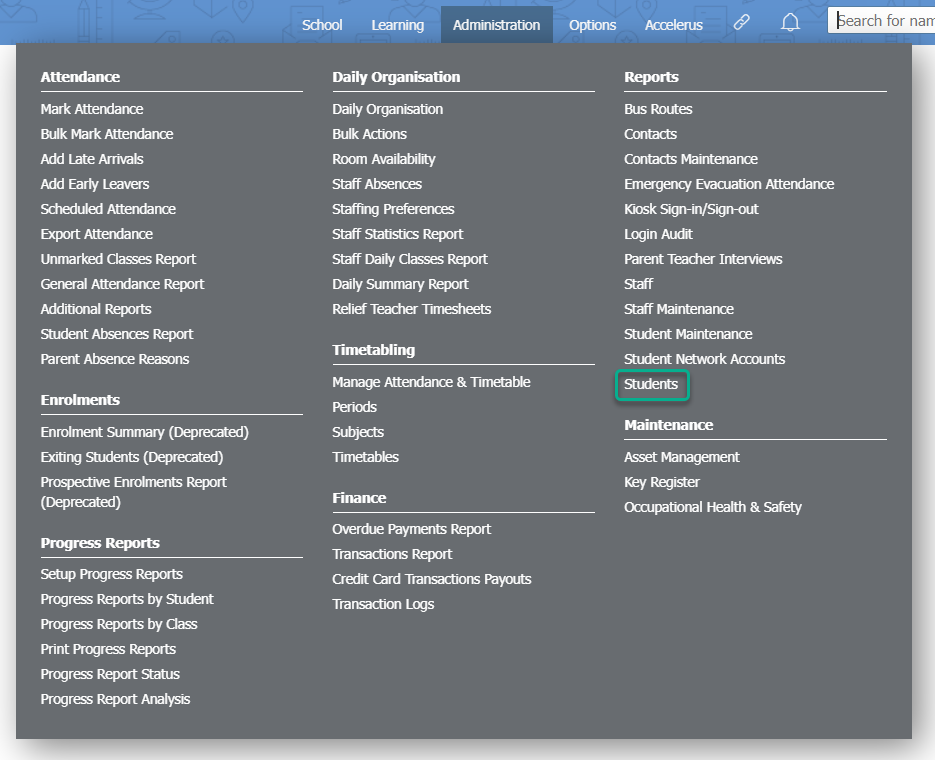
- Go to Administration > Reports > Students.
- Use the Search bar above the table to find a single student, OR
- Select the required filters to find the student(s) you would like to assign a coordinator to. You can see additional filtering options by clicking on the Filter icon.
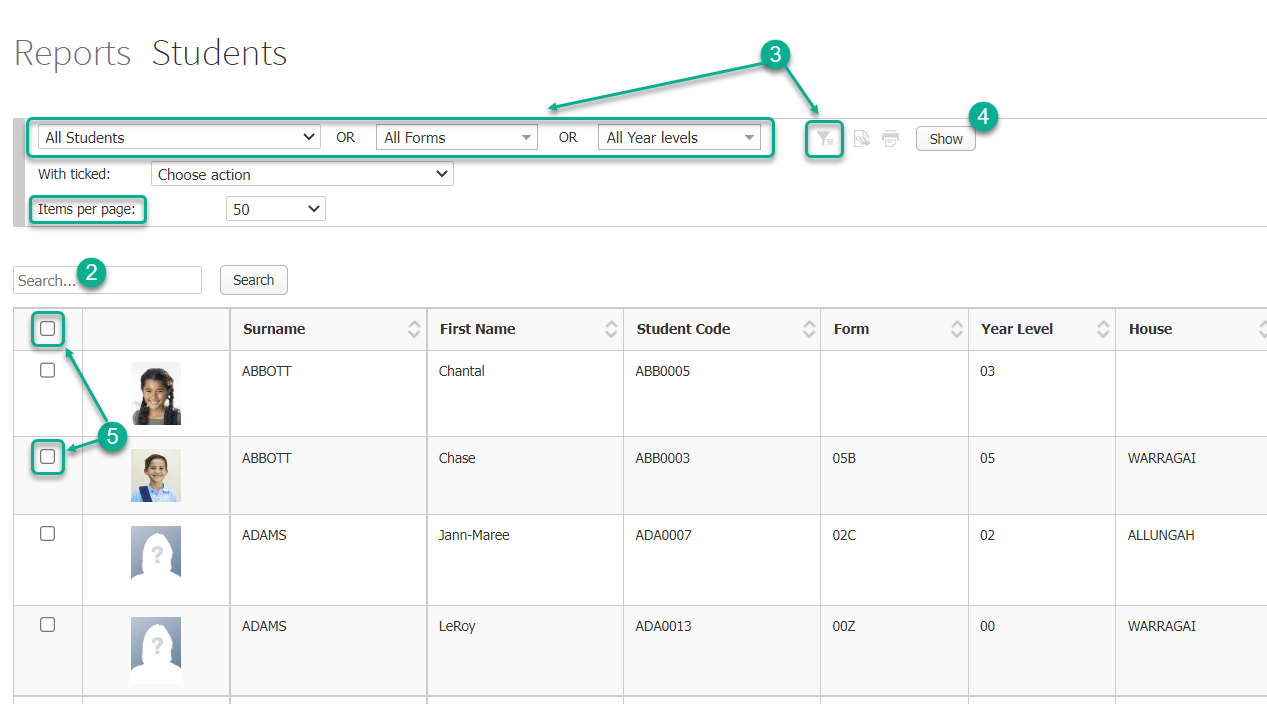
- Click the Show button.
- Select the corresponding checkboxes in the left hand column for the students you would like to assign the coordinator to, or select the checkbox in the column header if you would like to select all students. Note that this selects all students on the current page, so in some circumstances you may need to increase the number in the Items per page dropdown list.
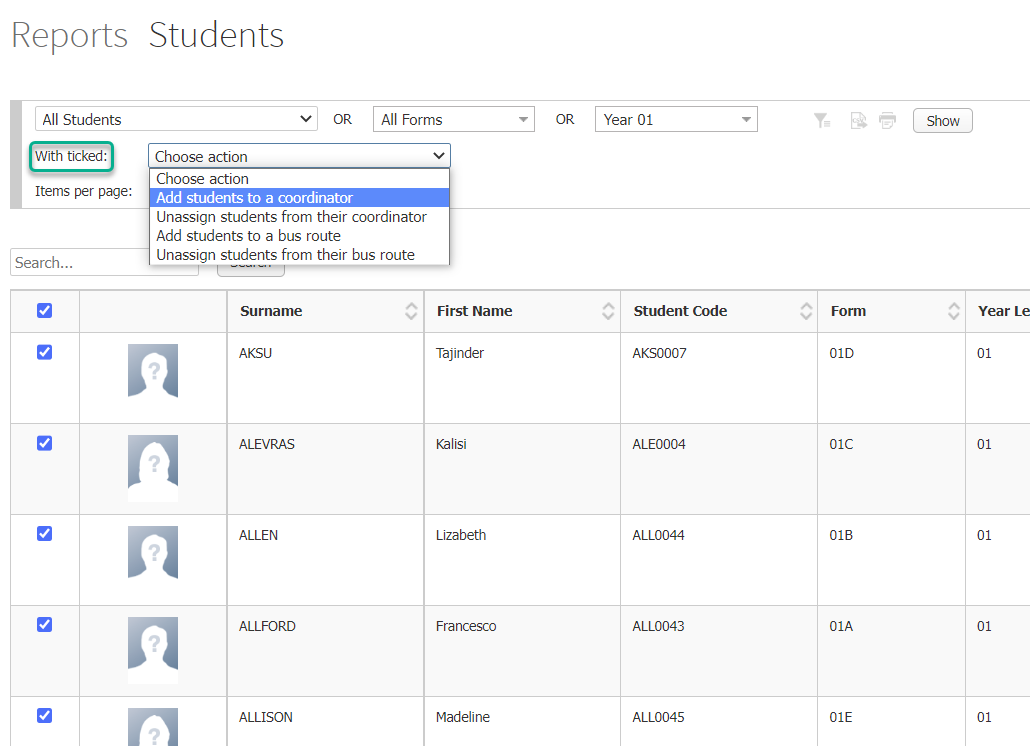
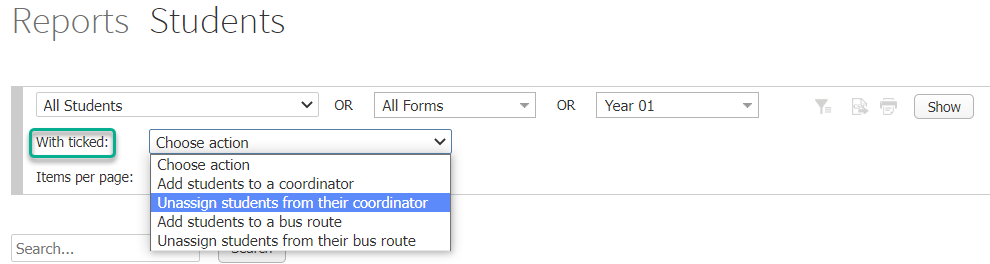
- Select Add students to a coordinator from the With ticked: dropdown list.
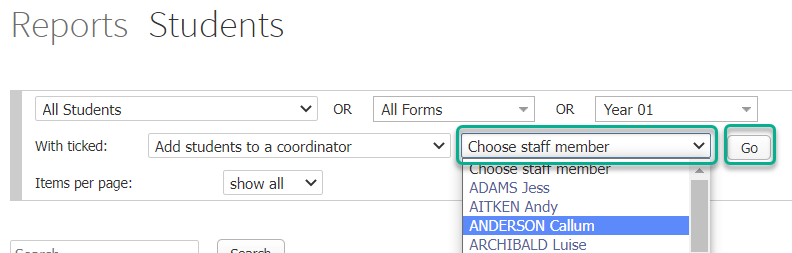
- Select the staff member who is to be the coordinator from the dropdown list, then click the Go button.
Removing students from a coordinator
- Follow Steps 1 to 5 from the above section, ‘Adding students to a coordinator’.
- Select Unassign students from their coordinator from the With ticked: dropdown list.
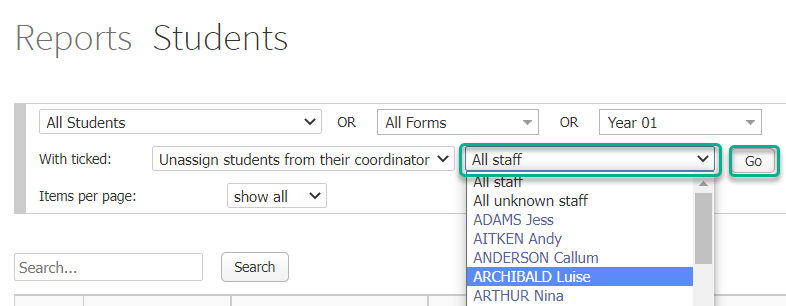
- Either leave the default option of All staff, or select the staff member you’d like to remove as coordinator from the student(s) from the dropdown list. Click the Go button.
Did you know…
You can allow parents/carers to make Parent Teacher Interview bookings with their child’s coordinators? You can do this by going to the PT Interview Settings under the Options menu and selecting the check box for Coordinator bookings.
If your school allows parents/carers and students to message teachers using Prestia, they will also be able to message that student’s coordinators.
Menambahkan atau menghapus koordinator untuk seorang siswa
Di Prestia, Anda dapat menambahkan anggota staf mana pun sebagai koordinator untuk seorang siswa. Fitur ini memungkinkan berbagai fungsi, seperti pemantauan Pulse pada staf, notifikasi pesan otomatis untuk insiden, catatan, dan banyak lagi.
Menambahkan Siswa ke Koordinator
-
Buka Administration > Reports > Students.
-
Gunakan bilah Search di atas tabel untuk mencari satu siswa, ATAU
-
Pilih filter yang diperlukan untuk menemukan siswa yang ingin Anda tentukan koordinatornya. Anda dapat melihat opsi pemfilteran tambahan dengan mengklik ikon Filter.
-
Klik tombol Show.
-
Pilih kotak centang (checkbox) yang sesuai di kolom sebelah kiri untuk siswa yang ingin Anda tentukan koordinatornya, atau pilih kotak centang di judul kolom jika Anda ingin memilih semua siswa. (Catatan: Langkah ini memilih semua siswa di halaman saat ini, jadi dalam beberapa kondisi Anda mungkin perlu meningkatkan jumlah pada daftar dropdown Items per page).
-
Pilih Add students to a coordinator dari daftar dropdown With ticked:
-
Pilih anggota staf yang akan menjadi koordinator dari daftar dropdown, lalu klik tombol Go.
Menghapus Siswa dari Koordinator
-
Ikuti Langkah 1 hingga 5 dari bagian ‘Menambahkan Siswa ke Koordinator’ di atas.
-
Pilih Unassign students from their coordinator dari daftar dropdown With ticked:
-
Anda dapat membiarkan opsi bawaan All staff, atau pilih anggota staf yang ingin Anda hapus fungsinya sebagai koordinator siswa tersebut dari daftar dropdown.
-
Klik tombol Go
Tahukah Anda?
-
Anda dapat mengizinkan orang tua/wali untuk membuat pemesanan Wawancara Orang Tua-Guru (Parent Teacher Interview) dengan koordinator anak mereka. Anda dapat melakukannya melalui PT Interview Settings di bawah menu Options, lalu centang kotak untuk Coordinator bookings.
-
Jika sekolah Anda mengizinkan orang tua/wali dan siswa untuk berkirim pesan dengan guru menggunakan Prestia, mereka juga akan dapat berkirim pesan dengan koordinator siswa tersebut.