
How to Unsubscribe a Parent from Email Notifications
Terkadang orang tua merasa kewalahan dengan terlalu banyak email di kotak masuk mereka. Hal ini dapat dimaklumi!
Ada baiknya untuk meninjau kembali apakah Anda perlu mengubah pengaturan notifikasi email di seluruh sekolah, dan mematikan yang tidak diperlukan. Lakukan ini melalui Options > Software Settings > Messaging.
Untuk menghentikan langganan orang tua
Jika ada orang tua yang meminta untuk berhenti berlangganan notifikasi email, berikut yang dapat Anda lakukan. Tindakan ini perlu dilakukan oleh administrator Prestia di sekolah.
- Buka Options > Software Settings > Lists and Options , dan kemudian cari Daftar Berhenti Berlangganan Orang Tua.
- Cari orang tua tersebut dan centang kotak Berhenti Berlangganan.
Ini berarti notifikasi email tidak akan dikirimkan kepada pengguna tersebut, namun orang tua lainnya tetap menerima semua notifikasi email.
Detailnya
Orang tua tersebut masih akan menerima email langsung melalui Prestia, dan mereka dapat memeriksa aplikasi Prestia mereka untuk semua pesan internal Prestia yang dikirimkan kepada mereka. Mereka juga masih dapat menggunakan notifikasi aplikasi Prestia jika mereka mau – mereka hanya tidak akan menerima email otomatis setiap kali mereka menerima pesan di dalam Prestia untuk hal-hal seperti Pesan Internal, notifikasi Kalender, item Berita, dan item Markbook.
Why unsubscribe?
Sometimes parents get a bit overwhelmed by too many emails in their inbox. Understandable!
It may be worth reassessing if you need to alter any of the school-wide email notification settings, and switch off any that are not necessary. Do this via Options > Software Settings > Messaging and SMS.
To Unsubscribe a Parent
If you have a parent asking to be unsubscribed from email notifications, here’s what you can do. The actions need to be taken by a Prestia administrator at the school.
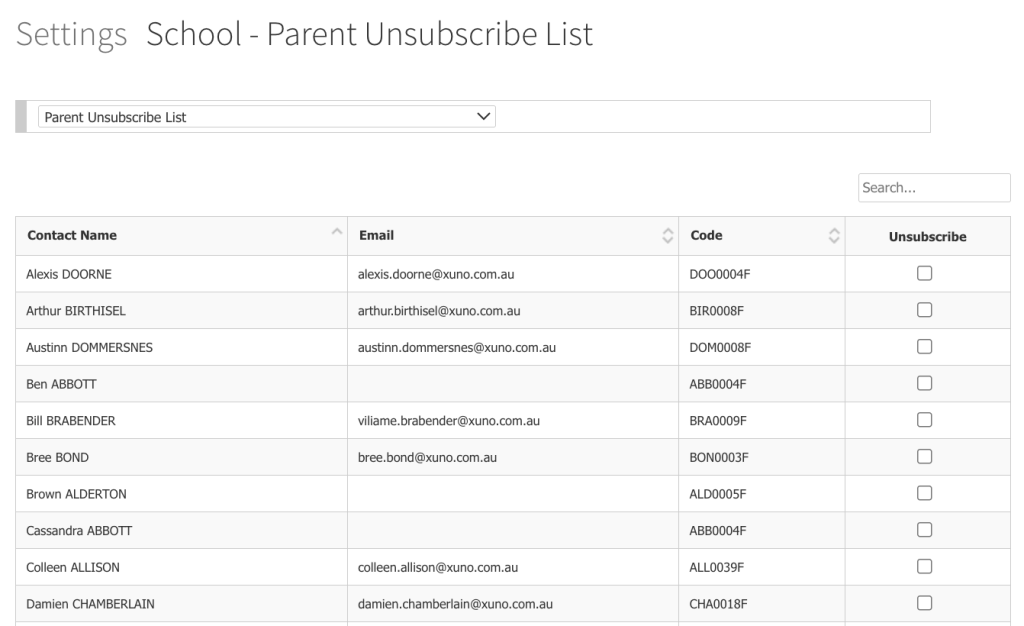
- Go to Options > Software Settings > Lists and Options, and then look for Parent Unsubscribe List.
- Search for the parent and tick the Unsubscribe box.
This means any email notification will not be sent to the user, however the rest of the parents still receive all emails notifications.
The Details
The parent will still receive SMS and direct email via Prestia, and they can check their Prestia app for all internal Prestia messages that are sent to them. They can also still use the Prestia app notifications if they wish – they just won’t receive automatic emails each time they are messaged within Prestia for things such as Internal Messages, Calendar notifications, News items and Markbook items.