
Export data out of Prestia
- Log in to Prestia as an Administrator.
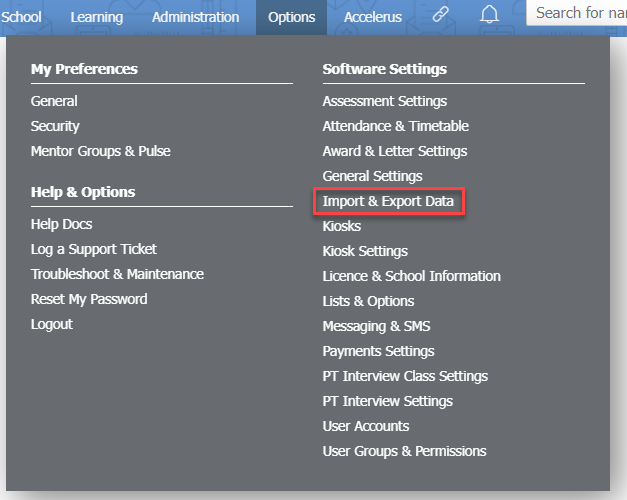
- Go to Options > Software Settings > Import & Export Data.
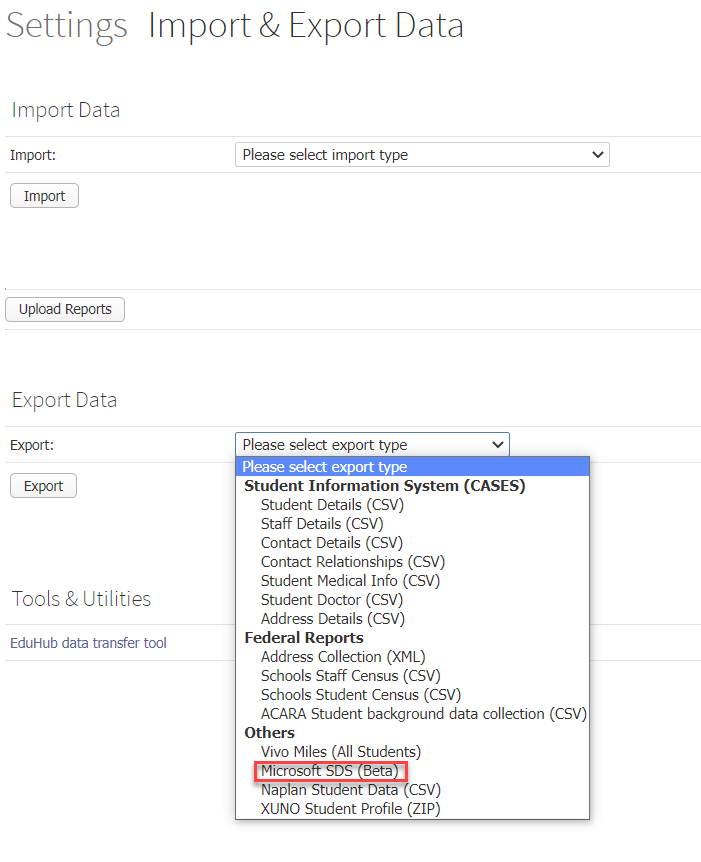
- Under the Export Data heading, choose Microsoft SDS (Beta) from the dropdown list.
- Click the Export button. Unzip the ms_sds.zip file.
This will export out the Prestia classes in their current format. If classes change, you will need to re-export data and import it into Microsoft Teams.
Import data into Microsoft Teams
- Log in to https://sds.microsoft.com/ as an Microsoft Teams administrator.
- Follow the Microsoft instructions given here: https://docs.microsoft.com/en-us/schooldatasync/how-to-deploy-school-data-sync-by-using-csv-file.
- This will create each class as a Team with a default General channel. The teachers and students will be assigned to the class.
Cara Membuat Kelas di Microsoft Teams dari Data Prestia
Artikel ini menjelaskan cara sekolah yang menggunakan Microsoft Teams versi Edukasi (Education) dapat mengekspor data dari Prestia untuk membuat kelas (Teams) baru secara otomatis bagi setiap mata pelajaran. Kelas-kelas ini akan langsung terisi dengan guru dan siswa yang sesuai.
Ekspor Data dari Prestia
-
Masuk (log in) ke Prestia sebagai Administrator.
-
Buka Options > Software Settings > Import & Export Data.
-
Pada bagian Export Data, pilih Microsoft SDS (Beta) dari menu dropdown.
-
Klik tombol Export, lalu ekstrak (unzip) berkas
ms_sds.zip.
Catatan: Langkah ini akan mengekspor kelas-kelas Prestia dalam formatnya saat ini. Jika ada perubahan data kelas di kemudian hari, Anda perlu melakukan ekspor ulang dan mengimpornya kembali ke Microsoft Teams.
Impor Data ke Microsoft Teams
-
Masuk ke sds.microsoft.com sebagai administrator Microsoft Teams.
-
Ikuti panduan resmi dari Microsoft di sini: Panduan Deploy School Data Sync Menggunakan File CSV.
Setelah proses selesai, setiap kelas akan otomatis dibuat sebagai Teams tersendiri dengan kanal utama (General channel), lengkap dengan guru dan siswa yang sudah terdaftar di dalamnya.