
View Student Incidents in Prestia
View Student Incidents in Prestia
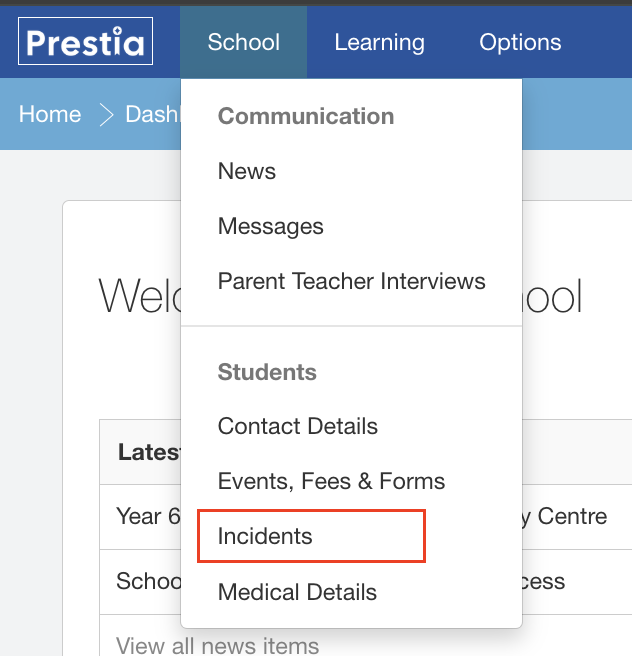
- Click on the School menu and then click on the Incidents item. If you’re using a mobile device, you’ll need to tap on the menu icon in the top left first, before you can tap on the School menu.
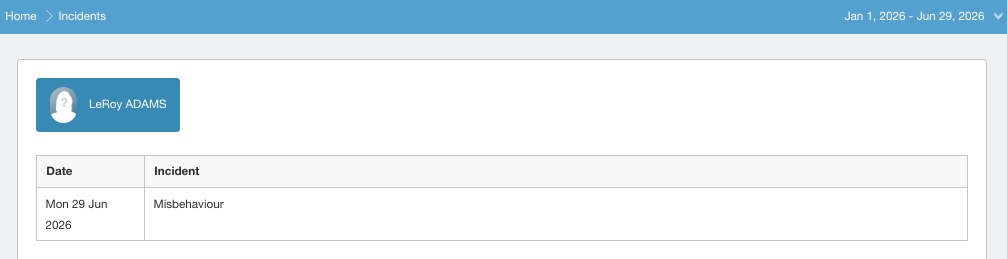
- Parents can select a specific child by clicking on the button labelled with their child’s name. If you are logged in as a student you will only be able to view your own incidents.
- The page will show all incidents for the current year, ordered with the most recent at the top. To view previous years or a different date range, click on the date picker in the top right of the screen, select your new date range, then click on the Update button.
- You are only able to view the type of incident assigned and not any of the details. For more information about each incident, please contact your school.
Melihat Insiden Siswa di Prestia Portal
Artikel ini ditujukan bagi siswa, orang tua, dan wali di sekolah yang menggunakan Prestia untuk mencatat insiden siswa.
Langkah-langkah
1. Klik menu School, lalu pilih Insiden. Jika Anda menggunakan perangkat seluler, ketuk terlebih dahulu ikon menu di pojok kiri atas, kemudian pilih menu School.
2. Orang tua dapat memilih anak tertentu dengan mengklik tombol yang menampilkan nama anak. Jika Anda masuk sebagai siswa, Anda hanya dapat melihat insiden milik Anda sendiri.
3. Halaman ini akan menampilkan seluruh insiden pada tahun berjalan, dengan insiden terbaru ditampilkan di bagian atas. Untuk melihat insiden dari tahun sebelumnya atau rentang tanggal tertentu, klik pemilih tanggal (date picker) di pojok kanan atas, pilih rentang tanggal yang diinginkan, lalu klik tombol Perbarui (Update)
4. Anda hanya dapat melihat jenis insiden yang telah dicatat, namun tidak dapat melihat rincian insiden tersebut. Untuk informasi lebih lanjut mengenai setiap insiden, silakan menghubungi pihak sekolah.