
Scheduled Programs Attendance Write-Back to Class Rolls
Pengaturan Baru “Update Class Roll” di Detail Program Terjadwal
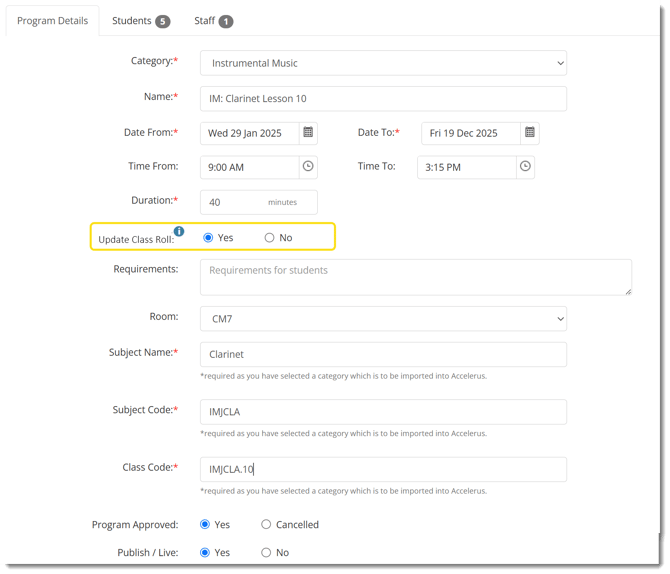
Kolom baru— Update Class Roll —telah ditambahkan ke halaman Detail Program Terjadwal.
-
Nilai default adalah “Tidak”
-
Ketika diatur ke Tidak , kehadiran yang ditandai dalam Program Terjadwal tidak akan memperbarui class roll siswa.
-
Ketika diatur ke Ya , menandai siswa sebagai Hadir akan secara otomatis memperbarui class roll mereka menjadi Hadir , terlepas dari status roll yang ada.
Bagaimana Pembaruan Otomatis Bekerja
Berikut adalah contoh bagaimana sistem akan berfungsi ketika program terjadwal memiliki Update Class Roll diatur ke Ya dan guru menandai siswa Hadir :
| Class Roll | Program Terjadwal | Hasil |
| Belum Ditandai | Hadir | Class Roll diperbarui menjadi Hadir |
| UA (atau alasan apa pun dengan ‘Perlakukan Sebagai UA’) | Hadir | Class Roll diperbarui menjadi Hadir |
| Ketidakhadiran yang Disetujui (atau alasan apa pun dengan ‘Perlakukan Sebagai Ketidakhadiran yang Disetujui’) | Hadir | Class Roll diperbarui menjadi Hadir |
| Datang Terlambat (atau alasan apa pun dengan ‘Perlakukan Sebagai Hadir’) | Hadir | Tidak ada pembaruan — Class Roll sudah mencerminkan status Hadir |
Jika Update Class Roll diatur ke Ya , menandai kehadiran siswa sebagai Hadir akan secara otomatis memperbarui class roll siswa menjadi Hadir. Harap dicatat bahwa setiap siswa dapat memiliki tanggal dan waktu pelajaran yang berbeda.
Antarmuka Kehadiran Siswa yang Diperbarui di Program Terjadwal
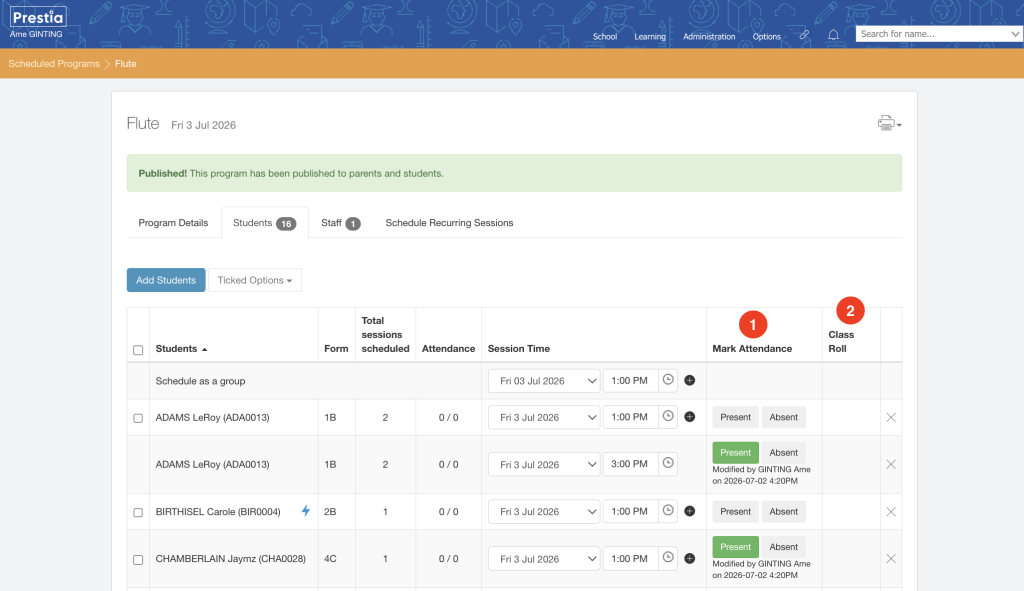
1. Untuk menyederhanakan penandaan kehadiran, halaman Siswa sekarang hanya mencakup dua tombol:
-
Hadir
Silakan lihat bagian Bagaimana Pembaruan Otomatis Bekerja di atas untuk deskripsi detail tentang bagaimana tombol Hadir akan memperbarui class roll siswa. Perhatikan bahwa Class Roll akan diperbarui sesuai dengan tanggal dan waktu sesi terjadwal siswa. -
Tidak Hadir
Tidak ada pembaruan yang akan diterapkan ke class roll.
Detail tambahan telah ditambahkan
- Kolom Modified By akan menampilkan anggota staf yang membuat perubahan dan stempel waktu ketika Hadir atau Tidak Hadir diklik.
2. Kolom Class Roll baru telah ditambahkan untuk memberikan lebih banyak konteks dan visibilitas kepada orang yang menandai roll program terjadwal.
Kolom ini menampilkan:
-
Status kehadiran Class Roll siswa
-
Nama staf Modified by dan stempel waktu
Peningkatan pada Laporan Kehadiran Program Terjadwal
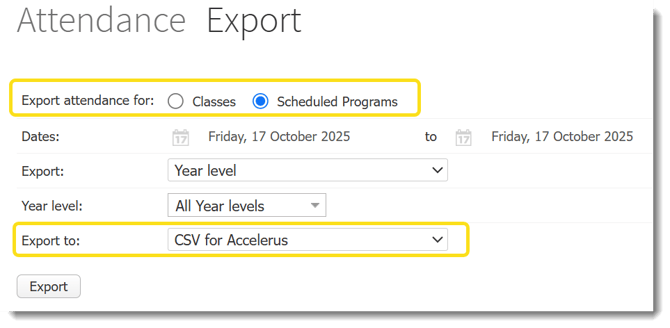
Di Administration > Export Attendance > Scheduled Programs > CSV for Accelerus , beberapa peningkatan telah diperkenalkan:
Kolom Baru & Diperbarui di CSV
-
Kolom Student Name ditambahkan (setelah Student Code)
-
Jumlah Approved Absence dan Unapproved Absence sekarang diambil langsung dari Class Roll dalam rentang tanggal dan periode yang ditentukan:
-
Approved Absence mencakup semua alasan di mana Treat As = Approved Absence
-
Unapproved Absence mencakup semua alasan di mana Treat As = Unapproved Absence
-
-
Kolom Parent Absence Reason ditambahkan di akhir, bersumber dari Class Roll siswa.
Perubahan ini memastikan pelaporan kehadiran yang lebih akurat dan keselarasan yang lebih baik dengan catatan sekolah.
New “Update Class Roll” Setting in Scheduled Program Details
A new field— Update Class Roll —has been added to the Scheduled Program Details page.
-
The default value is “No”
-
When set to No , attendance marked within the Scheduled Program will not update the student’s class roll.
-
When set to Yes , marking a student as Present will automatically update their class roll to Present , regardless of the existing roll status.
How Automatic Updates Work
Below are examples of how the system will behave when a scheduled program has the Update Class Roll set to Yes and the teacher marks a student Present :
| Class Roll | Scheduled Program | Result |
| Unmarked | Present | Class Roll updates to Present |
| UA (or any reason with ‘Treat As UA’) | Present | Class Roll updates to Present |
| Approved Absence (or any reason with ‘Treat As Approved Absence’) | Present | Class Roll updates to Present |
| Late Arrival (or any reason with ‘Treat As Present’) | Present | No updates — the Class Roll already reflects a Present status |
If Update Class Roll is set to Yes , marking a student’s attendance as Present will automatically update the student’s class roll as Present. Please note that each student can have a different date and lesson time.
Updated Student Attendance Interface in Scheduled Programs
1. To simplify marking attendance, the Students page now includes only two buttons:
-
Present
Please refer to How Automatic Updates Work section above for a detailed description on how the Present button will update the student’s class roll. Note that Class Roll will update according to the student’s scheduled session date and time. -
Absent
No update will be applied to the class roll.
Additional details added
- The Modified By field will show the staff member who made the change and the timestamp when Present or Absent was clicked.
2. A new Class Roll column has been added to provide more context and visibility to the person marking the scheduled program’s roll.
This column displays:
-
The student’s Class Roll attendance status
-
Modified by staff name and timestamp
Enhancements to the Scheduled Programs Attendance Report
In Administration > Export Attendance > Scheduled Programs > CSV for Accelerus , several improvements have been introduced: